
Central ERP and Sage Accounts
Outgrown Sage 50? Add operations and keep Sage for your books
Outgrown Sage 50? For most SMEs the answer is to keep it and add what is missing. Sage is long established accounting software trusted by UK businesses and their accountants. When operations outgrow spreadsheets, Central ERP manages customers, stock, orders and jobs, and connects to Sage through its API so your accounts stay exactly where they are.
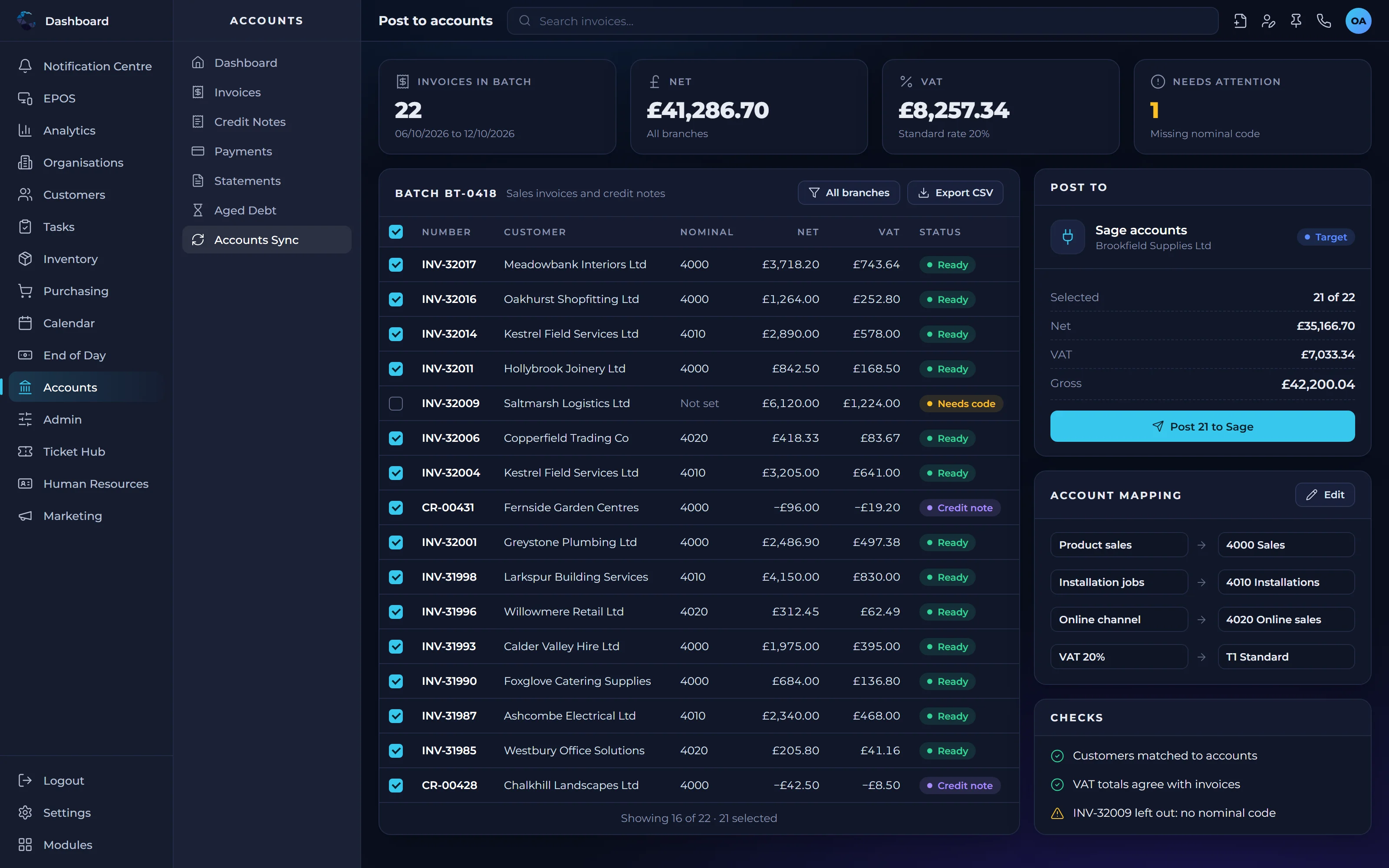
Outgrown Sage 50? Central ERP and Sage work better together
Sage stays in finance
Your finance team and accountants keep using Sage for ledgers, VAT and financial reporting, with no disruption.
Central ERP covers operations
Customers, inventory, purchasing, distribution, field service and HR run in one connected system.
Linked through the API
Financial data flows from Central ERP to Sage automatically, so nobody rekeys orders, invoices or purchases.
Central ERP vs Sage Accounts: pricing
Published list prices as shown by each provider, checked October 2026.
Central ERP
- Free
- £0
- Standard
- £40 per user per month, minimum 5 users
- Complete
- £80 per user per month, minimum 10 users
- Custom
- Priced to your requirements
Custom workflows and UK support from the team that builds it. See full pricing
Sage Accounting
- Plus
- £59 per month
Per business per month, excluding VAT. Lower priced Start and Standard plans are also available, and promotional discounts are often offered.
Sage Accounting is priced as an accounts package. Central ERP integrates with Sage, so you can keep your books where they are and add operational control alongside.
Source: Sage Accounting pricing, checked October 2026.
What each system is designed to do
| Central ERP | Sage Accounts | |
|---|---|---|
| Main purpose | Runs the whole business: customers, stock, operations, people and reporting | Accounting: ledgers, VAT, invoicing and financial reporting |
| Customer management | Customer Record Management linked to orders, jobs and history | Typically customer accounts for invoicing and credit control |
| Inventory and orders | Multi location stock, purchasing and distribution built in | Stock features vary by product, with wider operations often handled elsewhere |
| Field service and projects | Callout, install and project management included | Generally handled by separate software |
| Custom procedures | Custom task types with condition based automation | Generally focused on accounting processes |
| Accounting | Integrates with Sage so your books stay where they are | Core strength and the system of record for your accounts |
| Support | UK implementation and ongoing support from an established IT partner | Support typically through Sage and your accountant or reseller |
Sage Accounts is a trademark of its respective owner. This comparison reflects our general understanding and published information as at October 2026, and is intended as a guide only. Please check current details with each provider.
Which setup is right for you?
Central ERP is likely the right fit if
- You use Sage but manage stock, jobs or customers on spreadsheets
- You want operational control without changing your accounting software
- You need sector specific procedures and approvals built in
- You want one UK partner to implement and support the system
Sage Accounts on its own may be enough if
- Your requirements are mainly accounts, VAT and payroll
- Your operations are simple enough to manage without extra software
- Your existing Sage setup already covers your stock needs
Not sure which is right for you?
Talk it through with our UK team. We will give you a straight answer.
Frequently asked questions
Does Central ERP replace Sage Accounts?
No, it does not need to. Central ERP integrates with Sage through its API, so you keep Sage for your books while Central ERP runs customers, stock, orders, jobs and people. Your accountants carry on working as normal, and financial data flows across automatically without anyone entering it twice.
When does a Sage user need ERP?
A Sage user needs ERP when the rest of the business has outgrown spreadsheets and separate apps. Typical signs are rekeying orders into Sage, stock levels that never match, jobs tracked manually and slow reporting. Adding ERP alongside Sage connects operations to your accounts and removes that manual effort.
How does Central ERP integrate with Sage?
Central ERP connects to Sage through Sage's API. Sales, purchases and other financial transactions created in Central ERP pass across to Sage automatically. This keeps operational records and your accounts aligned, saves time on data entry and reduces the risk of errors from copying figures between systems by hand.
Can I keep my accountant if I add ERP?
Yes. Because Central ERP integrates with Sage, Xero and QuickBooks, your accountant can keep working in the accounting package they already know. Central ERP handles the operational side of the business, and the financial data they need arrives in your accounts automatically, so nothing changes in how they support you.
Should I upgrade from Sage 50 to Sage 200 or add an ERP?
It depends on where the pressure is. If the strain is in your accounts, such as more complex finance reporting, a larger accounting package may help. If the strain is in operations, such as stock, orders, jobs and customers, an ERP system tackles it directly. Central ERP is built for that operational side of the business.
Is Sage 50 an ERP system?
No. Sage 50 is accounting software for bookkeeping, VAT, invoicing and financial reporting. An ERP system runs the wider business from one database, including customers, inventory, purchasing, distribution, field service and people. Many SMEs keep Sage for their accounts and use an ERP system such as Central ERP to run day to day operations.
How long does it take to add ERP alongside Sage 50?
Typical setup and configuration of Central ERP takes 2 to 4 weeks, depending on how complex your operations are. Your accounts stay in Sage, so the work focuses on mapping your processes, setting up modules, bringing across customer and stock data and training your team. Our UK team agrees the plan with you before work begins.